
Tuesday, 12 April 2011
A Photo Of The Moon
A photo I took of the moon with my HS10. I used the 'A' (Aperture priority) mode, set AE to 'spot' and maximum F number for the aperture (smallest physical aperture).


Wednesday, 13 October 2010
Vulcan Bomber Spotted
Today I went out at lunchtime to watch a few work colleagues fly their model planes, and which were quite nice. There were two regular looking planes, one of which was a P51 Mustang (Caddillac of the sky) and also a really great looking bi-plane. They were all quite large scale models.
Whilst watching we were quite amazed at the odd sight of a real life bi-plane flying over, which seemed to odd coincidence as it's not every day you see one, especially not when currently flying a model one!
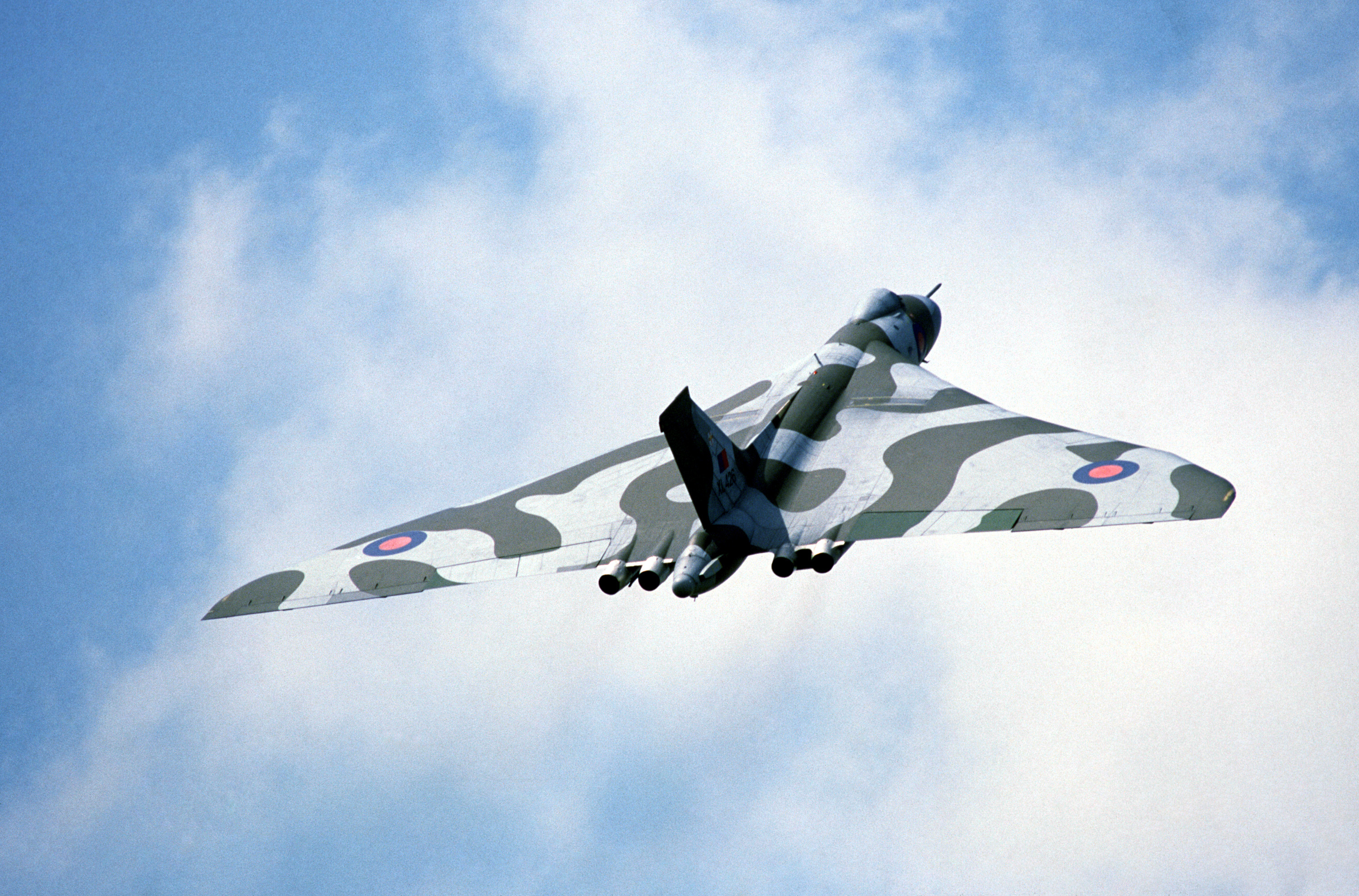
But then, to add to the bizarre aeronautical experience, low and behold in the not too far distance, a bloody great Vulcan Bomber came flying by! I couldn't believe what I was seeing! It was far enough away to be rather quiet but that just added to the impression of how large it is as it looked huge even in the distance.
It was flying very low and pretty slow and was accompanied by a smaller plane which just looked miniscule in comparison. Unfortunately it didn't come over head but made a long circle around us.
Even more bizzarely coincidental was the fact that I had been standing under one of these the previous weekend in the RAF museum, London (an excellent place to visit). When under one it is absolutely massive!
Apparently this is the only one left flying now an looking it up today it looks like it's not likely to be flying any more. They need to raise a lot of money to keep it air worthy. Check out the appeal website.
Feel privileged to have seen it.
Friday, 24 September 2010
The Moon, Jupiter and Galileoscope
Last night I went out to look at the pretty much full moon. It was really bright last night! Illuminating the garden enough to easily read a book by.
Whilst looking at the moon, Jupiter was VERY visible to the lower right of the moon, less than a fist's width away! Was an awesome sight. Jupiter has just (in the last few days) passed a point where it was closest to Earth for some years and is just past opposition.

The Moon and Jupiter. Poor photo taken with my phone.
Click to Enlarge
I couldn't get over how bright Jupiter was so I did what any good geek would do and got my binoculars out. Whilst collecting my binoculars I thought, hmm, may as well grab my Galiliescope as well.
I bought the Galileoscope last year when they first started releasing them. I have had a few plays with it but not a lot. I only have a camera tripod (which is better than no tripod!) and keeping it steady and navigating the sky can be tricky. But I have seen Mars through it and also had a nice view of the Orion Nebula. The Orion Nebula was definitely recognisable as a cloudy splurge, which was enough to get me excited and Mars was still just a round dot, but it was nevertheless a disc as opposed to just a point of light. Also it was a bit 'salmony' pink in colour, making it definitely more than just a star (by star I just mean point of light).
But last night, I looked at Jupiter firstly with my binos and even though it was hard to hold them steady, I could definitely detect it was a disc not a point of light. And I could also, for the first time, distinguish what looked like a moon of Jupiter to it's side!! I was amazed that I could make that out with just my binos!
So I got the Galileoscope quickly set up and pointed it at Jupiter. It was tricky getting the telescope to point at Jupiter, firstly to actually aim it at it and secondly to finely adjust the direction it was pointing was impossible with my camera tripod. It was a case of squeezing it in the direction I wanted to move, over-shoot, knowing it would spring back to where I want. Not very clever but all I could manage. Also, I had to ensure no single part of me touched the scope or tripod as it just wobbled like mad.
But it was worth it! I got a view of Jupiter through the scope and was able to distinguish definitely three of the four Galilean (quite fitting with my scope) moons! I was again amazed. Not only could I make out the moons, but I could also just about make out a band roughly around Jupiter's equator!!! It was mostly a bright white disc, but definitely with a slightly darker band around the middle.
I was chuffed! Can easily see why people get the bug and want bigger and better telescopes all the time. I will definitely, when life/finances allow, get myself a decent telescope one day.
Whilst looking at the moon, Jupiter was VERY visible to the lower right of the moon, less than a fist's width away! Was an awesome sight. Jupiter has just (in the last few days) passed a point where it was closest to Earth for some years and is just past opposition.

The Moon and Jupiter. Poor photo taken with my phone.
Click to Enlarge
I couldn't get over how bright Jupiter was so I did what any good geek would do and got my binoculars out. Whilst collecting my binoculars I thought, hmm, may as well grab my Galiliescope as well.
I bought the Galileoscope last year when they first started releasing them. I have had a few plays with it but not a lot. I only have a camera tripod (which is better than no tripod!) and keeping it steady and navigating the sky can be tricky. But I have seen Mars through it and also had a nice view of the Orion Nebula. The Orion Nebula was definitely recognisable as a cloudy splurge, which was enough to get me excited and Mars was still just a round dot, but it was nevertheless a disc as opposed to just a point of light. Also it was a bit 'salmony' pink in colour, making it definitely more than just a star (by star I just mean point of light).
But last night, I looked at Jupiter firstly with my binos and even though it was hard to hold them steady, I could definitely detect it was a disc not a point of light. And I could also, for the first time, distinguish what looked like a moon of Jupiter to it's side!! I was amazed that I could make that out with just my binos!
So I got the Galileoscope quickly set up and pointed it at Jupiter. It was tricky getting the telescope to point at Jupiter, firstly to actually aim it at it and secondly to finely adjust the direction it was pointing was impossible with my camera tripod. It was a case of squeezing it in the direction I wanted to move, over-shoot, knowing it would spring back to where I want. Not very clever but all I could manage. Also, I had to ensure no single part of me touched the scope or tripod as it just wobbled like mad.
But it was worth it! I got a view of Jupiter through the scope and was able to distinguish definitely three of the four Galilean (quite fitting with my scope) moons! I was again amazed. Not only could I make out the moons, but I could also just about make out a band roughly around Jupiter's equator!!! It was mostly a bright white disc, but definitely with a slightly darker band around the middle.
I was chuffed! Can easily see why people get the bug and want bigger and better telescopes all the time. I will definitely, when life/finances allow, get myself a decent telescope one day.
Monday, 23 August 2010
Backing Up My Life With Amazon Web Services
Amazon's Simple Storage System or S3 for short, is what I have decided to use from now on (for now until I discover yet something else) to backup my life.
S3 seems to be the solution I have been looking for for ages. A simple, flexible, no-contract, reliable and easily accessible storage facility that resides entirely in the cloud. Its cost is based on exactly what you use; rather than renting a fixed amount of space on some server, you just pay AWS for what you use of their services. So if you upload N amount of data you will be charged for storing N amount of data per month. If you access that data for COPYing GETting or PUTting commands then you will be charge per command. So you can use it as little or as much as you like.
There is a perfect little application called s3sync which is a small ruby program which syncs data you specify to S3. It works very much like rsync. This is ideal as it is a command line program so I can run it on my web server which contains a lot of data I wouldn't like to loose, such as family photos/videos.
I altered my backup script to now use this new method, based on a great tutorial I found on the web, which is dated as 2006, so this has been around for a long time.
I have this setup as a cron job once a week.
S3 seems to be the solution I have been looking for for ages. A simple, flexible, no-contract, reliable and easily accessible storage facility that resides entirely in the cloud. Its cost is based on exactly what you use; rather than renting a fixed amount of space on some server, you just pay AWS for what you use of their services. So if you upload N amount of data you will be charged for storing N amount of data per month. If you access that data for COPYing GETting or PUTting commands then you will be charge per command. So you can use it as little or as much as you like.
There is a perfect little application called s3sync which is a small ruby program which syncs data you specify to S3. It works very much like rsync. This is ideal as it is a command line program so I can run it on my web server which contains a lot of data I wouldn't like to loose, such as family photos/videos.
I altered my backup script to now use this new method, based on a great tutorial I found on the web, which is dated as 2006, so this has been around for a long time.
#!/bin/bash
#Backup script for server


#set variable of date for labelling
date=`date +%F`


cd /home/user/backupdata/


#remove oldest mysql backup
rm `ls -t *mysql* | tail -n 1`


#Dump mysql databases
mysqldump --all-databases > /home/user/backupdata/${date}_mysql_backup


cd /home/user/bin/s3sync/
export AWS_ACCESS_KEY_ID=My Amazon Access Key ID

export AWS_SECRET_ACCESS_KEY=My Amazon Secret Access Key

export SSL_CERT_DIR=/home/user/bin/s3sync/certs

export AWS_CALLING_FORMAT=SUBDOMAIN

ruby s3sync.rb -r -v --ssl --exclude="/home/user/some/dir" --delete /home/user mybucket:

ruby s3sync.rb -r -v --ssl --delete /var/www mybucket:
I have this setup as a cron job once a week.
Friday, 20 August 2010
Upgrade Drupal Core and Restore from Mysql Backup
For too long the admin pages in my http://drupal.org site have been bugging me to upgrade from 6.12 core to the latest, which recently for to 6.19. I have been putting it off after reading the upgrade.txt which describes how to do it as it sounding a little lengthy and I just never had the time to do it.
I tried once but it didn't work. I went 'more or less' through the process described in upgrade.txt, which accompanies the download, but after doing it the admin pages still said it was out of date, as if I hadn't done anything, which was odd as I had deleted almost everything and replaced it with the new version.
Anyway, I came back to it recently and decided to sort it out. I downloaded the latest core and followed the instructions to the letter. But once again, my admin pages still showed me at 6.12, as if I had just done nothing!
This was obviously a bit annoying as I had very carefully followed the documentation. So I put my problem out in the #drupal-support IRC room on irc.freenode.net and started getting some helpful hints to start tracking down the problem.
The very best bit of information I got was a suggestion to use drush. drush is a command line program that you run in a terminal on the web server, within the site root. It is a simple little program that can perform such functions as checking the current status of the site, check for updates of modules, install those modules, clear cache, run update.php etc. The beauty is the feedback it gives you, highlighting any problems with error messages to help track down problems.
The first problem I came across when trying to update all modules was a duplication error, where one 'piece of code' was conflicting with another of the same name. This was preventing modules from updating. So after tracking down and removing the duplicate files, all modules (except core) updated seamlessly.
Now every time I ran the command
Trouble was that drush wasn't reporting any error messages and even
I tried to track down any duplications in my site's directory but there was nothing. So I finally decided to start afresh and wipe everything out and install 6.19 as new.
To ensure I would not loose all my site content, including nodes, images, modules, theme, functionality I needed to ensure I backed up everything I could possibly need.
I made a complete copy of my site's root directory, in this case /var/www/. I also made an up to date dump of the mysql database, very important as this is where everything is contained.
To make a backup of the mysql database:
Obviously ensure you back up the right database. In this case my database was called 'drupal', but it could have been called anything. If you need to add certain user and password options, add
Next was to make the bold move and empty var/www. I then dropped the database in mysql.
To drop a database, enter the mysql environment with 'mysql' with admin privileges, then simply enter the command
I then, perhaps niavely, believe that I have to use a unique user for each mysql database I have so I issue the following command to grant privileges to my chosen user on the drupal database:
Next I downloaded and unpacked the latest drupal core:
I then went to my root page in a web browser and ran the standard install script to get a new, empty up to date drupal installation.
Next was to get all my existing data back into my site for the mysql backup to try and make it appear as if everything is just as it was before.
The key to getting all content and settings back is to write the mysql dump back into mysql into the newly created, albeit same named, drupal database. But before this will work, you have to put all the modules that were present in the installation when the mysqldump was performed back in place so that the database doesn't get confused thinking it has modules installed that are not present.
To find out which modules were installed I created a temporary database in mysql and wrote the backup into that just so I could examine it. To write a mysqdump into a new database:
I then wanted to view what modules were installed in this database backup. To do this I viewed what tables were in the database in the mysql environment:
This showed me all the entries in the system table containing the modules. I could then examine this list to see what modules were installed and also, importantly, which versions of each module. This is though where the backup of /var/www/ comes in handy, as all the modules that were installed are contained in here. So using the list in mysql, which also tells me the location of each module. So I just copied each module back from the backup into the right location in the new installation.
Once I was happy that I had replaced all the existing modules, I wrote my drupal database dump in to the new database and ran update.php............... and it was mostly back!
All my themes were back (after copying the theme dir from backup), all my nodes and views were working. There were just some files missing, such as uploaded images, but again copying these back in from the back up solved this.
I tried once but it didn't work. I went 'more or less' through the process described in upgrade.txt, which accompanies the download, but after doing it the admin pages still said it was out of date, as if I hadn't done anything, which was odd as I had deleted almost everything and replaced it with the new version.
Anyway, I came back to it recently and decided to sort it out. I downloaded the latest core and followed the instructions to the letter. But once again, my admin pages still showed me at 6.12, as if I had just done nothing!
This was obviously a bit annoying as I had very carefully followed the documentation. So I put my problem out in the #drupal-support IRC room on irc.freenode.net and started getting some helpful hints to start tracking down the problem.
The very best bit of information I got was a suggestion to use drush. drush is a command line program that you run in a terminal on the web server, within the site root. It is a simple little program that can perform such functions as checking the current status of the site, check for updates of modules, install those modules, clear cache, run update.php etc. The beauty is the feedback it gives you, highlighting any problems with error messages to help track down problems.
The first problem I came across when trying to update all modules was a duplication error, where one 'piece of code' was conflicting with another of the same name. This was preventing modules from updating. So after tracking down and removing the duplicate files, all modules (except core) updated seamlessly.
Now every time I ran the command
drush pm-update or drush up drupal to try and get the core module, drupal, to update from 6.12 to 6.19, it would run through the apparent process with successful messages, but then if I ran them again, it would keep saying it was at 6.12 and needed updating. So the update was failing.Trouble was that drush wasn't reporting any error messages and even
drush core-status would confusingly say it was at 6.19, but everything else said 6.12.I tried to track down any duplications in my site's directory but there was nothing. So I finally decided to start afresh and wipe everything out and install 6.19 as new.
To ensure I would not loose all my site content, including nodes, images, modules, theme, functionality I needed to ensure I backed up everything I could possibly need.
I made a complete copy of my site's root directory, in this case /var/www/. I also made an up to date dump of the mysql database, very important as this is where everything is contained.
To make a backup of the mysql database:
mysqldump drupal > drupal_dump.sqlObviously ensure you back up the right database. In this case my database was called 'drupal', but it could have been called anything. If you need to add certain user and password options, add
-u username -p password after mysqldump. This will create a text file containing the whole database. I wasn't sure how I would use it yet, but I just knew backing it up was the thing to do if I stood any chance of putting all my data back into the new site.Next was to make the bold move and empty var/www. I then dropped the database in mysql.
To drop a database, enter the mysql environment with 'mysql' with admin privileges, then simply enter the command
DROP DATABASE drupal;. I then re-created the database so it was new and empty, but using the same name: CREATE DATABASE drupal;I then, perhaps niavely, believe that I have to use a unique user for each mysql database I have so I issue the following command to grant privileges to my chosen user on the drupal database:
GRANT ALL PRIVILEGES ON drupal.* TO myuser@localhost IDENTIFIED BY 'password';Next I downloaded and unpacked the latest drupal core:
cd /var/www/

wget http://ftp.drupal.org/files/projects/drupal-6.19.tar.gz

untar xvf drupal-6.19.tar.gz
I then went to my root page in a web browser and ran the standard install script to get a new, empty up to date drupal installation.
Next was to get all my existing data back into my site for the mysql backup to try and make it appear as if everything is just as it was before.
The key to getting all content and settings back is to write the mysql dump back into mysql into the newly created, albeit same named, drupal database. But before this will work, you have to put all the modules that were present in the installation when the mysqldump was performed back in place so that the database doesn't get confused thinking it has modules installed that are not present.
To find out which modules were installed I created a temporary database in mysql and wrote the backup into that just so I could examine it. To write a mysqdump into a new database:
mysql drupal_tempdb < drupal_dump.sqlI then wanted to view what modules were installed in this database backup. To do this I viewed what tables were in the database in the mysql environment:
USE drupal;

SELECT * FROM system WHERE TYPE = 'module';
This showed me all the entries in the system table containing the modules. I could then examine this list to see what modules were installed and also, importantly, which versions of each module. This is though where the backup of /var/www/ comes in handy, as all the modules that were installed are contained in here. So using the list in mysql, which also tells me the location of each module. So I just copied each module back from the backup into the right location in the new installation.
Once I was happy that I had replaced all the existing modules, I wrote my drupal database dump in to the new database and ran update.php............... and it was mostly back!
All my themes were back (after copying the theme dir from backup), all my nodes and views were working. There were just some files missing, such as uploaded images, but again copying these back in from the back up solved this.
Saturday, 7 August 2010
Seesmic Desktop on Ubuntu
I have been using Seesmic (#seesmic @seesmic) on my Android phone (HTC Desire) for a while now and must say I like it a lot. Just works nice and looks good. Plus support for Facebook is coming soon and I like the 'all-in-one' type of approach.
I had a look at the great Seesmic web app. and it looks great, works anywhere you have a web browser. Also noted they have a desktop client too, which runs using Adobe Air. Adobe Air is avaible to install from the repos in ubuntu so I gave it a go.
First:
sudo apt-get install adobeair
Once installed, this added Adobe Air Application Installer to the Applications > Accessories menu.
Download the air file from the seesmic website
Open that from the menu and it prompts you to browse for an air file to install, simply follow on-screen instructions to install the app. You will be prompted for your admin password.
Once installation is complete follow the simple set up wizard to add Twitter and Facebook accounts.
Great app., check it out.
Thursday, 15 July 2010
Predators
I went to see #Predators yesterday and I am in two minds as to what I think about it. I came out feeling a little, unimpressed, but maybe I am being unfair. I think, I could argue both ways about this film. I am a huge fan of Predator and I think this is part of the problem, as with many films these days that are either based on or remakes of classic films.
OK, when the film started, I was excited to begin with, especially as they were using the music from the original film, which I really loved and it got you in the mood for something, hopefully, like the first film. It was interspersed with new music to make it a bit unique, which was fine. This was a great touch!
The introduction of the characters by dropping them in from 'somewhere' seemed like a good a way as any to start. The basis that they had been abducted to be dumped in this game reserve for hunting fits in well with the likely lifestyle of a Predator. You can easily imagine this race of hunters, who devote their lives to becoming the best and most feared hunters, doing something like this to hone their skills and train their young. And picking the best of different species of life from around the galaxy would be the greatest way to advance their knowledge and technology.
But, it soon began to annoy me that if this bunch of people we were being introduced to were meant to be representing the best of the best of Mankind in terms of warriors, then I was a little unimpressed. I don't know whether it was the acting or the scripting, but they didn't come across to me as what I imagine the best of the best. They seemed all too the usual Hollywood swaggering, big gun totting, tough guys, rather than the probably quite introverted and skilled people I imagine. (and where was the British SAS guy?)
Anyway, I think it was probably lack of research into what an elite group of people would be like. Hosing down anything that moved with a mini-gun is not what I would expect from a Spetznaz soldier. These people just didn't act or talk or move like I think they should have.
I just think the casting wasn't great. The lead role guy annoyed me in his demeanour and just didn't come across as the elitist he was supposed to be. A cast of mostly unknowns is never a good sign, sometimes it works, but not this time.
But anyway, on with the story. As I said, it is a good film on its own, looking into one part of the Predators life. Half of me is trying hard to convince myself of this, the other half is just saying, it was another excuse to put Predators on the screen killing people. Don't get me wrong, I love to see this. I don't know why I am doubting it though.
There were quite a lot of homages to the original Predator, which was fun to spot but also a bit cheesy and dissapointing that they seemed to be relying on this rather than creating its own story and cool bits without the need to basically copy things from the original. Biggest example for me was when the Chinese guy decided to make a last stand whilst the hero, female and injured guy escape (another homage - Dutch, Anne and Poncho in the end). They played the exactly the same music, had him strip his top off and cast it away, then even using the same camera angle at his belt level when he withdrew his sword and then cut his chest and await the Predator. Too much!
Why would a 'good' film need to do this? A second film with different characters in a different situation in a different place should not be somehow playing out the exact same motions as someone else. This to me is just to somehow please fans so they could say, 'oo its just like the original'. But by doing this, to me, it says this film is not good enough on its own.
Some homages were good, such as the voices saying 'over here' and 'turn around'. These were what made the original tense and it worked again for me, but then I alos think...why the same words in the same tone... it just cries 'not good enough to think of something original'.
And what the fuck was Laurence Fishburne's character all about?? That was the most weird and pointless bit of the film to me. That whole sequence could have been left out and it would have absolutely no consequence to the film's storyline. It could have been very good, a previous victim, somehow surviving on his own, learning about the Predators and how to evade them and fight them, but he was just portrayed a raving loony who tried to kill them then just got shot ever so easily by a Predator. After evading them for '10 seasons' he seemed very easily killed. Very disappointing.
Ah the traps in the beginning of the films set up by the dead man they found...again, they were all like they were pulled off the set of Predator. Just unnecessary. And the words spoken about 'a firefight'.... 'they were shooting in all directions' Too much.
The Predators themselves; as with a lot of horror films about monsters, showing too much just tends to spoil the effect. The original films pulled it off. I don't know how but it did. It was gradual, but in the end you saw the whole thing. I think only Kevin Peter Hall can pull off moving like a Predator. Maybe just because he was the original and there is nothing else to compare to that before the first, but he moved so well. The other films that have Predators in them (abominations which shall remain nameless) just don't seem to have the right gate or style. They look clumsy and like they are uncomfortable or something. Not like agile extreme fighting beings.
It was really cool to see a bunch of them, as in reality they would all look different and dress individually, but again, its weird, unless they look like the original Predator, they just don't look right. The main bad Predator, just looked a bit too much like he had rubber mandibles.
And of course at the end, the guy covered in mud.... sigh, I guess you could argue that yes its the only way to disguise your heat signature from them, but please, he just looked like some nerd playing 'I'm Arnie'. No one will ever look as cool as Arnie did in that film! From start to end, Arnie was my childhood idol in that film.
I seem to not have enjoyed this film. I did and I didn't. I just think nothing will match the effect of the original film. I am sure (hope) that the film makers were huge fans like me and wanted to make something new and cool about Predators, but it just failed to impress me. I really want to love it and anything to do with Predators, but I just think no one can make the right movie that captures the coolness of what the Predators are.
It as meant to be a sequel to the first, in the same style as the first. I don't see how it a sequel at all. Also its only like the first because they basically copied a lot of the first and in my opinion relied on that too much.
I just think if a real fan made a film about the Predator, it would be much better. I think to many people have just seen $$$ signs flashing before them when using the name of Predator (and Aliens in exactly the same way).
There really needs to be some law that allows the original creators of something like Predator or Aliens to have a say in whether new films can be made or not as it is potentially going to ruin the reputation of the originals for the sake of a quick buck and then into the bargain basement of some DVD store.
If I am being too harsh please leave a comment, I would love to hear counter-thought and also praise for this film.
On a side note, a nerdy one too, when they broke cover and saw the sky for the first time and realised that they were on an alien planet, it looked like the usual bad science mistake of a moon or small planet that is supposed to look like it has been hit by a meteor or something and broken it up as it appears as a shattered moon with all bits just floating near each other in a suspended state or something... this just wouldn't happen!
Subscribe to:
Posts (Atom)